
Centralised job information is a cornerstone of field service management software.
After all, if your job status dashboard isn’t making your life easier, it likely isn’t the right solution for you.
With this in mind, Commusoft puts clear job information at the forefront of our Job Dashboard for job management software.
Discover how to strengthen and support your daily activities by enabling your admin teams to quickly navigate a large number of jobs, access important details, and take key actions, all from a single screen.

What is a Job Status Dashboard?
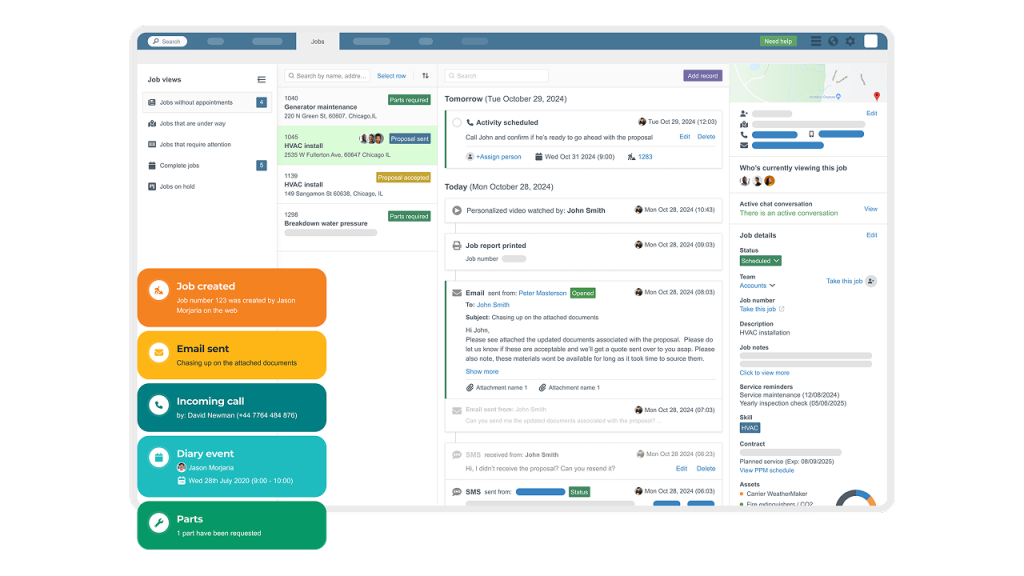
A field service dashboard gives users an at-a-glance view of their jobs. This tool enables admins to manage job-related activities, such as timelines, details, pipelines, and more.
Commusoft’s Job Dashboard makes it easier for office managers and directors to oversee their teams. We display your appointments front an centre, on a single screen, removing the need to navigate multiple tabs and windows to get the full picture.
From here, leaders can understand the current situation, identify tasks that need to be actioned, and know which team members are responsible for what.
Optimising your service-related activities with a job status dashboard makes it possible to progress and complete jobs faster, without additional stress or team members.
Benefits of Commusoft’s Field Service Dashboard
Streamlined job details can help you structure and support your administrative team. From enhanced visibility and task delegation to expedited business growth, implementing Commusoft’s digital job management dashboard has many advantages. Let’s review each one.
Enhanced Visibility
Dashboards can reduce the number of screens and clicks to find information, meaning your team can be more productive. Plus, real-time updates ensure no job is forgotten about.
Increased personalisation, such as custom job statuses and pipelines, makes it easier to standardize procedures and workflows.
Admins can control their personal dashboard views, and managers can easily oversee their teams. Additionally, a dashboard system with clear details and event histories ensures information isn’t in one person’s head.
Clear details and workflows ensure your admins can work through and progress jobs quicker, meaning they can get more done each shift.
Improved Task Delegation
The key benefit of a job status dashboard is organisation. Accessible job details make it possible to improve daily operations dramatically.
You can structure your team around handling specific job types, service types, job statuses, and more. This means that you can put the right information in front of the right people and better prioritise jobs. This process enables team managers to establish clear responsibilities for each admin, and help them progress jobs faster.
Additionally, you can boost productivity with automated features. For example, you can set a custom workflow that changes the job status and assigns it to a different team when a job has a calendar event added against it. This means you can automatically delegate tasks to teams or owners based on specific criteria.
Business Growth
Top-notch job management dashboards improve collaboration and clarity within and between teams.
This makes it possible to build processes that scale.
With jobs moving through each department quicker, repetitive tasks reduced, and increased accountability, you can expand the business without the need to increase headcount.
When hiring is necessary, clear processes and available details make it easier to quickly onboard new admins and bring them up to speed. No need to stress about processes and details falling through the cracks.
Features of Commusoft’s Field Service Dashboard
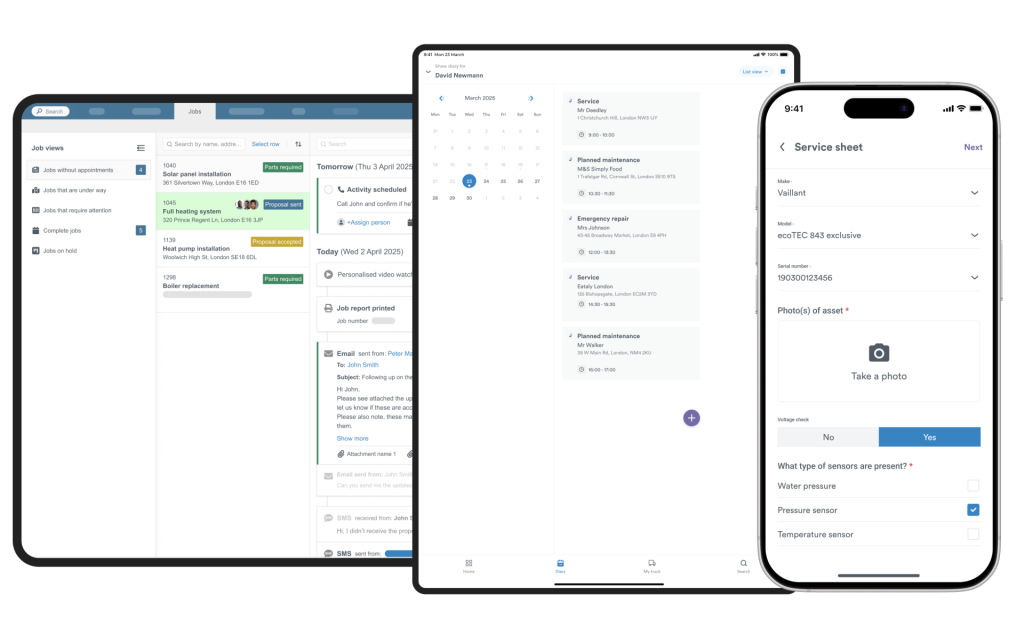
A field service job monitoring dashboard is the centrepiece of most field service job management software. Commusoft is no exception. Let’s review some of the most important capabilities our platform offers.
Filtered Views
Admins should have the freedom to manage their dashboards their way.
With Commusoft’s job dashboard, you can create specific views to make navigating easier and more logical. For instance, you can filter your dashboard by “jobs to be invoiced” or “jobs to be scheduled”.
With custom views, you can be as specific as you need.
If your business handles a high volume of commercial clients and jobs, you can create a filter called “Jobs for ABC Property not yet scheduled”.
Additionally, you can also create and implement company-wide or team-based views that are permission-based. This gives managers additional control of the day-to-day and ensures company alignment.
They can deploy views to users without the need to set them individually per account.
If you have separate teams to manage servicing or installation, you can enable access to your “installations” view to specific users.
This will dramatically reduce visual clutter on the screen, helping admins find exactly what they need and stay productive.
Job Timeline
Having a single source of truth to reference will make it easier to understand each job’s current status, and how to progress them to completion.
A job timeline will display all activities and details for a specific job, including appointments added, status updates, invoices created, digital certificates, and more.
This information, chronologically displayed, will aid admins in understanding what has happened so far on a job, and how it may impact the actions they need to take.
Additionally, a job timeline enables your team to seamlessly cover a teammate who is sick, on holiday, or has left the company: everything you need to know is recorded in the job timeline.
Even more, a search box and filters will make it even easier to pinpoint exact information.
Even more, the ability to add records from this screen can further streamline administrative tasks. This should include recording typical communications such as SMS, emails, phone calls, notes, and scheduled activities.
Plus, the ability to create new appointments and invoices is especially helpful for dispatchers and financial staff respectively.
Job Details
Naturally, job information is essential. How the information is displayed on the screen makes all the difference.
On the left-hand side of Commusoft’s Job Dashboard, users can view customer information, job addresses, SLAs, job statuses, job notes, engineer skills, and service contracts. This gives provides an overview for admins to grasp the current situation quickly.
Paired with the detailed timeline view, admins will have everything they need to know about the job, in one place.
Job Pipelines
Similar to a sales pipeline, which is a method of visualising each stage of a sales process, from initial inquiry to job won, a job pipeline ensures your admins can better manage and oversee every stage of the job.
With Commusoft, you can create custom job pipelines and associate specific job descriptions with them. A commercial solar panel installation job will have more steps than a standard HVAC service.
Additionally, you can set “job statuses” such as “jobs booked”, “jobs cancelled”, and “jobs without invoices”.
Organising jobs into pipelines means admins can better track and manage complicated jobs and workflows.
Furthermore, this makes it easier to oversee and action jobs as they move backward and forwards within the pipeline; such as when an appointment is canceled.
Ultimately, if your team has highly complex job workflows, a job pipeline offers unmatched customisation and organisation.
Maximise Daily Output and Transform Your Business Today
With clear job information and streamlined workflows hosted in our job status dashboard, your daily operations can thrive. The ability to manage the scope of your services, whether you want an overall glance of current activities, or look into specific tasks and service types, means you can boost productivity your way.
Learn more about job management software and custom job dashboards with Commusoft, or schedule a call with our team of experts to get started today!



 English (United States)
  English (UK)