
Investing in digital solutions to streamline your diary management is a smart choice, providing many ways to boost productivity.
However, careful planning is required to make scheduling software work well for your team. Read our blog to discover the best methods for removing obstacles to adoption and improving confidence in the new system.
Efficient scheduling processes can fuel business growth, presenting opportunities to increase your operational capacity, expand your service areas, and attract highly-skilled engineers.
Commusoft’s job scheduling software has a wide-range of powerful features designed to simplify your diary management. Knowing how to implement and utilise these tools is crucial for getting the best value from your solution.
We’re going to examine the best ways of making scheduling software work for your team, and what steps you can take to help ease the transition.

Customise the Schedule to Suit Your Needs
Job scheduling software works well for trades business because it offers plenty of flexibility, solving a common pain point for customers who are frustrated with clunky older systems.
Match Engineer Skills to the Right Jobs
When initially setting up your platform, you’ll want to prioritise customising the schedule. Adding your engineers’ skills and qualifications is a good place to start, as this will ensure the right team member is assigned to the job every time.
Manage Your Team’s Capacity
Organising a busy calendar can be complex, which is why it’s worth implementing custom shift patterns to make the scheduling software work for you.
Allocating service windows, such as “morning between 8am and 12pm” or “afternoon between 1pm and 5pm”, means your calendar aligns with your core working hours and appointments aren’t booked when no one’s available!
You’re able to further personalise the settings by factoring in things like:
- Employee roles: including full-time, part-time, and contracted.
- Breaks and planned leave: it’s useful to account for unplanned events (e.g. medical appointments, holidays and lunch breaks).
- Unplanned absence: this enables you to closely monitor employee sickness.
Connect the Field to Your Office
Choosing a system with integrated mobile workflows can foster better collaboration between your field and office teams, improving overall productivity.
Empower Engineers with Instant Job History
Many businesses approach Commusoft because their current system lacks detail and clarity. Our mobile workforce management software resolves this by giving engineers the details they need in seconds. Their calendar grants them instant access to a complete service history, previous notes and photos, and site details, meaning they always arrive on-site prepared.
Maintain Accuracy with Automated Data Syncing
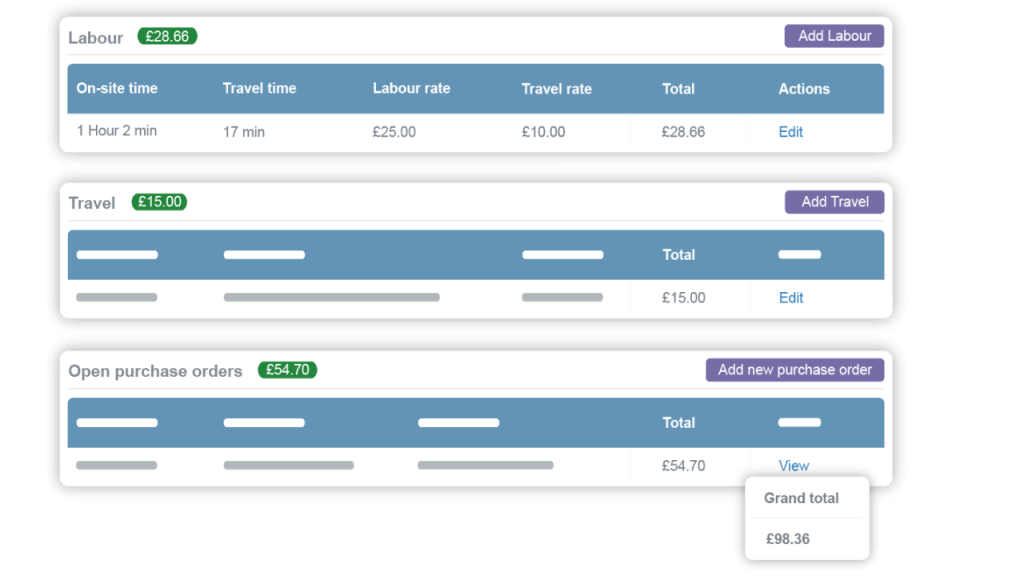
To enable accurate job costing and payroll, engineers can log notes, status updates, and travel on the app, which is updated directly against the job record.
The software supports offline capabilities too, essential for making the scheduling software work for busy field service engineers. This way, any details captured after they lose signal will automatically sync once they are back online, reducing any downtime.
Give Your Office Team Full Visibility
As data is securely stored in a centralised platform, it’s readily accessible to your office team as well. This significantly reduces your admin burden and encourages better collaboration between your different business functions.
The solution should also include fleet management, which provides dispatchers with a live map of each vehicle and a complete record of its activity. This makes it much easier to re-route engineers in emergency situations, while monitoring habits like speeding and harsh braking promotes safer driving practices.
Use Automation to Streamline Processes
If your main reason for considering job scheduling software is streamlining processes, automation could be a game-changer.
Utilise Intelligent Job Scheduling Tools
Managing complex shift patterns, qualifications, location, and skillsets is quicker with intelligent scheduling tools. It analyses these different factors and your team’s schedule to suggest the best engineer and time slot for every job, maximising daily output without any fuss.
Set Up Customer Alerts
Be sure to set up customer alerts and notifications on your new system, which are a great way of boosting their satisfaction. Job confirmations and follow-ups are no longer dealt with manually, reducing no-shows and freeing up your team to focus on other priorities.
ETA alerts offer further opportunities to keep customers happy and informed throughout. The workflow is simple: when an engineer marks their status as en route, the client receives an email or SMS notification. This includes a link to a live map where they can track progress, avoiding unnecessary calls back to the office for updates.
Use Automated Service Reminders
And to simplify your service contract management, think about using automated reminders. This notifies customers when their planned preventative maintenance (PPM) is due, with a link to book their service. Once they’ve selected a convenient service time, the job is automatically generated in your schedule and added to their customer record.
Having mechanisms like this in place increases your recurring revenue and ensures routine appointments aren’t missed, without requiring any direct involvement from your office team.
Read: check out our guide to online appointment systems, where you can learn about their benefits in closer detail.
Link the Schedule to Your Invoicing
There’s many advantages to linking the schedule to your digital invoicing engine, such as protecting your cashflow and giving you a clearer picture of your company’s financial health.
Integrate with Your Accounting Software
The best scheduling software will support your accounting integrations, like Xero or Sage, displaying data in a single, unified view. This streamlines your admin function, saving time that’s regularly wasted searching for information manually across different systems.
Implement Automated Billing
Automated billing helps your business get paid faster; all job costs, like labour time and parts used, are stored digitally in one system and reconciled against the job record. This produces a full, itemised invoice that’s sent to the customer once work is completed.
Digital billing tools can prove useful for engineers too, allowing them to take payments directly on-site with their field service mobile app. As this is synced to your live schedule, engineers aren’t required to enter details manually – everything is already recorded for them!
Simplify Contract billing
To better manage your service contracts and maintain profitability, consider implementing a recurring invoice schedule.
Simply choose your preferred payment cycle e.g. monthly, quarterly, annual or custom, and an invoice will be sent automatically to your client. This accelerates your cashflow and means you never miss a planned visit.
Moving Your Team Over to the New System
Getting employees acquainted with the new system and actively involving them at every stage of the journey is essential for making the scheduling software work in the long-term.
Here’s some important steps to consider that’ll help you achieve a smooth transition to the new software:
- Create a realistic plan: A detailed plan is invaluable during the adoption phase, and should contain information like project timelines, testing procedures, and data migration strategies.
- Clear communication: Focus on effective internal communication to keep your employees informed, which might entail explaining problems with your existing systems or asking for their opinions on different solutions.
- Dedicated onboarding process: It’s worth following a structured onboarding programme so employees feel confident using the new system, lowering the likelihood of manual errors in the future.
For additional support when you’re getting started, check out our software training tips for job management systems.
Commusoft: The Smartest Way to Schedule
You’ll now have a clearer understanding of how to make scheduling software work for your team, helping you achieve maximum value from your investment.
And remember, powerful software doesn’t need to come with added complexity. Commusoft’s dynamic solution streamlines processes with intuitive workflows, offering easy navigation and seamless diary management.
If this all sounds good to you, be sure to explore our all-in-one job management software today!







 English (United States)
  English (UK)