Commusoft vs. Other FSM Software
While most software will offer the necessary tools to cover the essentials of job scheduling, proposals, and invoicing, businesses need to investigate how these features work. What the software’s limitations are, and whether or not it can support your needs now and into the future.





Book a Demo
Thanks for getting in touch
We are not available in your region yet
We appreciate your interest. We do not offer demos in your country at the moment, but we are working to expand. We will keep your details and let you know if that changes.
Thanks for getting in touch
Thanks for your interest in Commusoft
We noticed you have selected a team size of 1-3. To ensure our platform delivers a genuine return on investment, Commusoft is specifically designed for businesses with 6 or more staff. We want to make sure we are the right fit for your current goals. If you are ready to see how we can support your growth, please check your inbox – we have sent an email to book a time in our team calendar.
Trusted by 30,000+ Trades Professionals
Clients love us—200+ 5 Star Reviews


Evaluate…

Commusoft vs. The Competition:
Finding Your Fit for the Best Field Service Management Software in the UK:
For decision-makers who need a high-level overview, the following table categorises each platform based on its ideal user profile and primary core strength.
We’ve identified a short-list of strengths and limitations before we dive in to more detail:
| to help you grow | Ideal UK Business Profile | Core Strength | Key Limitation for Growth |
| Commusoft | Residential & Commercial Companies, looking to Scale | Depth of features, high customisation & strong automation tools | Not suitable for businesses in construction |
| Tradify | Sole Traders & Small Teams | Low barrier to entry | Lacks depth for complex jobs and contracts |
| BigChange | Fleet-heavy Businesses | Customisable | Lengthy lock-in contracts; lacks industry specialism |
| Payaca | Renewable Energy Installers | Niche industry focus | Limited for multi-trade businesses |
| JobLogic | Maintenance & Commercial firms | Asset management focus | Lacks powerful automation versus competition |
| SimPro | Large, process-driven firms i.e. construction | Comprehensive project management features | Steep learning curve, commercial focus, rigid workflows |
| Jobber | Home Service Businesses | User-friendliness in office and the field | Lacks commercial depth, wouldn’t suit companies looking to scale |
| ServiceM8 | Broad appeal for a variety of industries | Built for small businesses | Focuses on an iOS-first system, with limited Android functionality. Less feature-rich. |
Commusoft vs. Tradify
For Businesses Ready to Scale Beyond the Basics
For businesses taking their first step away from paper-based systems, platforms like Tradify offer an accessible entry point.
Its reputation is built on simplicity and ease of use, making it a good tool for organising the fundamental workflows of a small trade business.
However, the simplicity that makes Tradify appealing for sole traders and small teams becomes its primary constraint. Businesses are more likely to run into issues as they mature and their operational needs evolve.
In contrast, Commusoft occupies the strategic space for businesses that have made the move to go paperless, but who have growth in mind.
Tradify is also built with a different niche: Commusoft is built for field service business carrying out traditional plumbing, heating, electrical and gas work at both a residential and commercial scale, whilst Tradify’s specialism is more in construction and project management.
Depending on the operation you run, this is an important consideration of whether their tools are exactly right for you, or where you might find yourself paying for features you don’t need.
Workflow Depth & Limitations:
- Tradify’s Position: Tradify’s workflow is praised for its linear efficiency: creating a quote, converting it to a job, and issuing an invoice. For small businesses managing a high volume of similar, uncomplicated tasks, this streamlined process is an advantage over manual methods.
- Commusoft’s Strength: Commusoft is engineered from the ground up to handle operational complexity. Its capabilities include those above, but extend far beyond simple job management to include planned preventative maintenance (PPM), service contract management, fleet management, and more.
- The Verdict: While Tradify effectively organises the present-day tasks of a small trade business, Commusoft provides the foundational tools required to build a more complex and profitable future. For any UK business aiming to move into the commercial sector or manage long-term service contracts, Commusoft’s depth is a strategic necessity.
For a UK business owner planning for the future, choosing a system that solves today’s problems without creating tomorrow’s limitations is paramount.
Commusoft vs. JobLogic
Where Field Experience and Modernity Drive Profit
JobLogic has earned its place in the UK FSM market by offering foundational features, with a particular focus on asset management and planned maintenance workflows. This makes it a contender for businesses where servicing and maintaining a large register of customer assets is the core function.
However, the platform’s power is undermined by two weaknesses cited by users: a dated user interface and a mobile application that has seen reports of working unreliably in areas of poor connectivity.
In a field service business, the field service mobile app is the engineer’s single most important digital tool. A failure in the field directly translates to lost time, frustrated staff, and delayed revenue.
Commusoft provides powerful asset maintenance software and houses its tools within a modern, intuitive, reliable platform with robust offline capabilities. It is designed to empower engineers to be more efficient, professional, and profitable in the field, even when offline and will sync immediately with the office upon resuming an internet connection.
Mobile Access: The Engineer’s Most Important Tool:
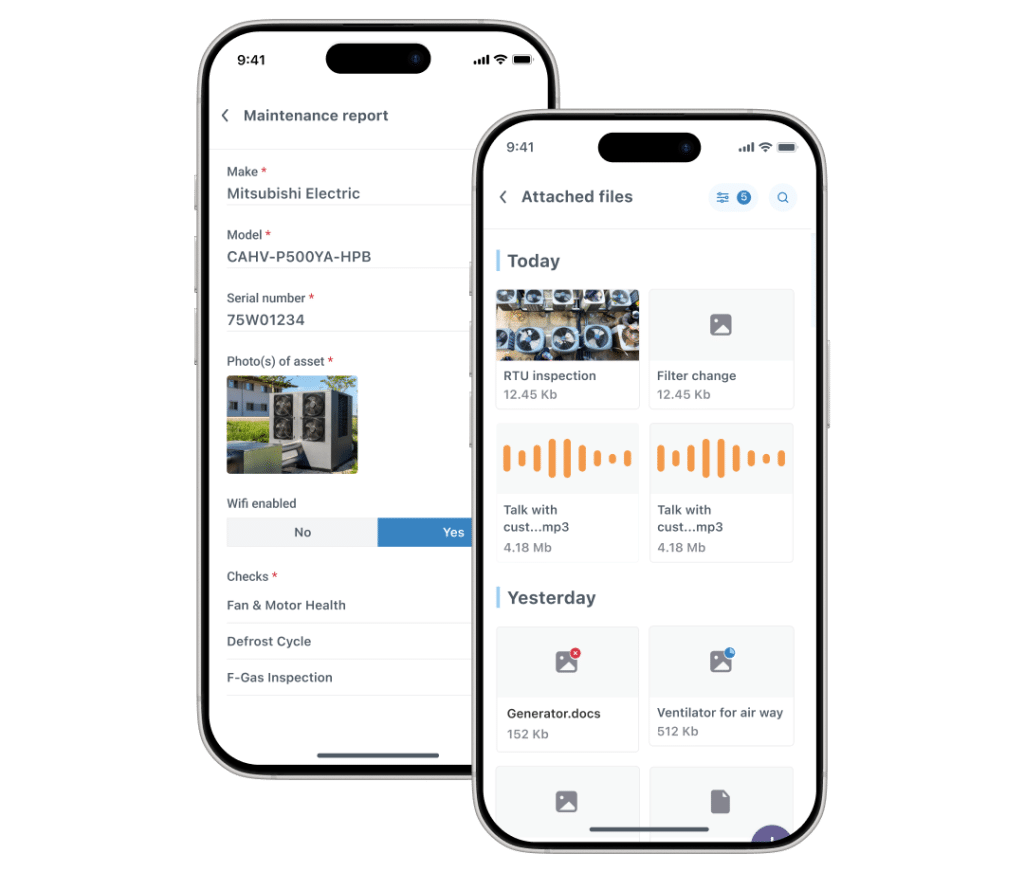
- JobLogic’s Position: Asset management is a strength of the JobLogic platform but it comes at an additional price. It offers features for building and maintaining asset registers, scheduling planned preventative maintenance. However, user reviews report that the app can struggle with poor connectivity, with engineers experiencing lag and difficulties syncing data from the field. Given that engineers frequently work in basements, rural areas, or new construction sites with unreliable signal, this is an operational risk.
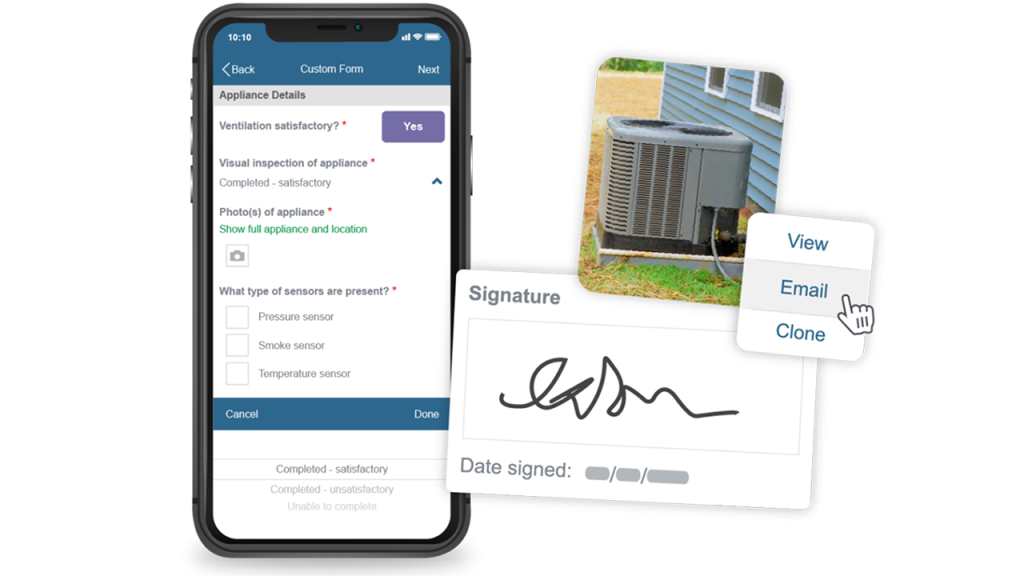
- Commusoft’s Strength: Commusoft offers a comprehensive asset management feature. The asset data seamlessly informs the more advanced scheduling engine, is accessible via a more reliable mobile app, and can be analysed through a more powerful reporting suite. Commusoft’s mobile app is a versatile and powerful extension of the main system, designed to work reliably in real-world conditions. It has full offline functionality, allowing engineers to record all job information, take site photos, complete customisable digital forms, and capture signatures without a live internet connection. The data then syncs automatically once connectivity is restored.
- The Verdict: An FSM platform is only as strong as its mobile component. Commusoft’s reliable, offline-capable mobile app provides the resilience and functionality that UK field teams require to perform their jobs efficiently and without frustration.
Commusoft vs. ServiceM8
The Platform-Agnostic, Full-Featured Solution
ServiceM8’s proposition is for a specific segment of the market: trade businesses that are heavily invested in the Apple ecosystem. Its iOS app is well-regarded for being fast and easy to use, providing a good user experience. However, this strength is also a weakness. The platform’s deep focus on Apple devices creates a “walled garden,” and although an Android version is available, the experiences are mixed.
On the other hand, Commusoft is built and maintained for both iOS and Android devices, meaning that no matter what device your team prefers to use, they can operate at the same level. Commusoft provides a consistently powerful, full-featured, and regularly updated experience for all users (on mobile and desktop), regardless of preferred platform.
This makes it the more robust, flexible, and inclusive choice for diverse UK teams.
Device Independence and Flexibility:
- ServiceM8’s Position: The company is transparent about its focus on Apple, stating that it is “Optimized for Apple” and recommends that businesses use iPhones and iPads to get the most out of the software. The Android “Lite” version is limited, opting for only the essentials for users. While this has a logic to it, it means that a business has to either standardise devices with expensive Apple hardware or accept a disparity in capability between its team members, which can limit productivity and efficiency.
- Commusoft’s Strength: Commusoft is built to be platform-agnostic, offering powerful, purpose-built mobile applications for both iOS and Android with no feature disparity. This ensures that every engineer in the field has access to the same powerful tools—including full offline capabilities, custom forms, and invoicing—regardless of their preferred mobile device. This approach is more inclusive and practical for the reality of most UK workforces.
- The Verdict: ServiceM8’s Apple-first approach can create technical and cultural challenges within a growing team. Commusoft’s commitment to a consistent, high-quality experience across both major mobile platforms makes it a more flexible and future-proof choice for UK businesses.
Commusoft vs. SimPro
When Powerful Tools Need to be Usable and Supported
SimPro is a strong player in the FSM market, offering a vast feature set aimed at larger, process-driven trade and service businesses. On paper, its capabilities are extensive. In practice, however, this power is often hindered by what some reviews describe as a steep learning curve, with rigid and inflexible workflows.
The experience of implementing and using software is as important as the feature list itself. After all, without good training, people simply won’t pick up and may even entirely overlook core functions of a software tool.
Commusoft offers a comparable level of enterprise-grade power but places a premium on usability, workflow flexibility, and has highly-rated, UK-based customer support. This ensures that businesses can not only purchase powerful features, but can actually implement, adopt, and leverage them effectively to drive growth.
Implementation, Training, and Support:
- SimPro’s Position: The implementation process for SimPro is frequently described as cumbersome and difficult. While power is a good thing, some reports suggest that ongoing customer service is slow and unhelpful. This can lead to a frustrating and protracted onboarding process, delaying the time to value.
- Commusoft’s Strength: Commusoft has built its reputation on a foundation of outstanding customer support. The company provides personalised training sessions with dedicated implementation specialists, rather than relying solely on videos. This hands-on approach ensures a smoother, faster setup; and the Academy videos help supplement that training. Furthermore, its UK-based support team receives consistently high praise for being responsive and helpful, reflected in high scores for quality of support and ease of setup.
- The Verdict: A difficult implementation and poor ongoing support can cripple a software investment before it ever delivers a return. Commusoft’s commitment to a supportive, personalised onboarding process and highly rated UK-based support de-risks the investment and ensures businesses are set up for success. Commusoft has the flexibility to work with companies, so that they can “build workflows that are unique to them, thanks to reusable templates for proposals, certificates, service reminders, invoicing, and more. SimPro’s rigidity requires a business to conform to the software. Commusoft’s flexibility allows the software to adapt to the business.

There is no way we could run our business efficiently and effectively… we just simply could not run it without Commusoft.

Job & Technician Tracking
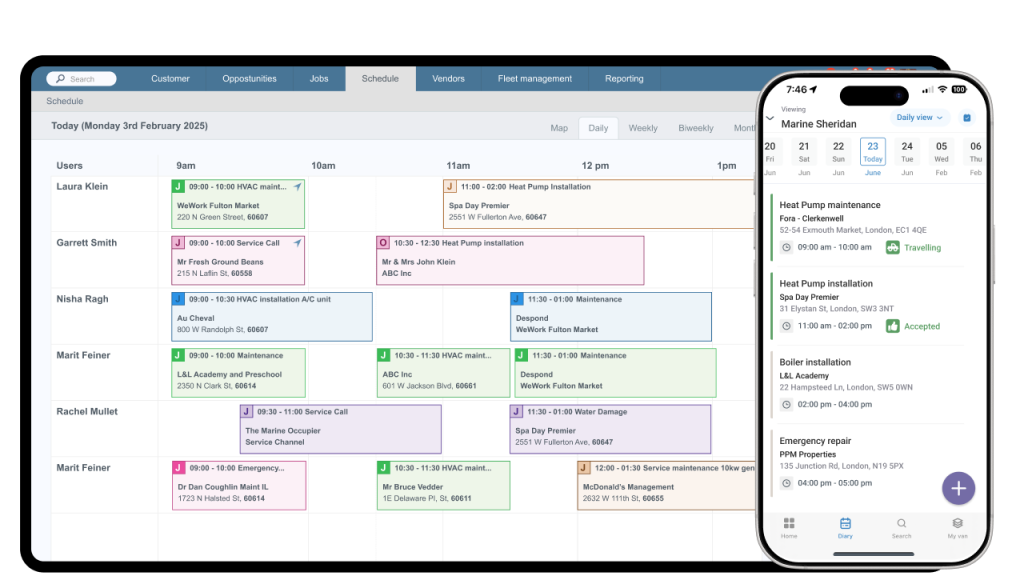
Real-time location tracking and job progress monitoring.
Offline Mobile App
Full access to job data and forms in the field, with automatic syncing.
Instant Invoicing & Payments
Generate invoices automatically and take credit card/Direct Debit payments in the field.
Customer Communication
Automated job confirmations and 'on my way' updates.
Stock Management
Keep track and allocate parts, whether they are in the warehouse, office, or a van.
Automated Follow-ups
Send automated follow up messages for when customers haven’t yet responded and booked their service.
We may already have the answers to your question.
Does Commusoft integrate with my accounting software?
Absolutely. Commusoft features deep, two-way integrations with Xero, QuickBooks, Sage, and FreeAgent to keep your VAT, invoices, and expenses perfectly synced without manual entry.
Can it handle Planned Preventative Maintenance (PPM)?
Yes. You can easily set up recurring service schedules for commercial assets. Commusoft will automatically generate the required jobs in your diary and remind you when SLAs are due.
Can I customise quotes and invoices with my branding?
Yes, you have full control over the look and feel of your customer-facing documents, ensuring you present a highly professional image to domestic and commercial clients alike.
Can my customers book appointments online?
Absolutely. Our nline booking portal can be integrated directly into your website, allowing customers to request service 24/7, capturing leads you might otherwise miss.
 English (United States)
  English (UK)