
Key Takeaways
- Join us to explore the major benefits of upgrading your field software to simplify your daily operations and hit your growth objectives.
- Alongside this, learn how to recognise the signs that it's time to switch from your current system.
- Read our tips to successfully implement your new software solution to drive long-term success.
If your current software is slowing your team down, constantly crashing, or you’ve simply outgrown it, then it’s probably time to upgrade. Using an unsuitable system can cause serious problems for your business, limit growth, and negatively impact your profit margins.
Switching to a new field service management platform can be a game-changer for ambitious trades business, simplifying your daily operations so you can focus on hitting your growth objectives.
Let’s explore the biggest benefits of upgrading your field service software, signs you’re ready to switch, and insights into choosing the right solution for your business.

Signs You Need to Upgrade Your Field Service Software
Here’s five common signs that it’s time to look at upgrading your field service software:
- Your customers aren’t happy: When system problems start trickling down to your end-customer, it can negatively affect your business’ reputation. They want solutions that offer speed and convenience, and won’t be impressed if you don’t provide this.
- You’ve outgrown its functionality: If you’ve expanded your operations, it’s possible that your current system can’t support the increased capacity or the complexity needed to manage them efficiently.
- Too much time is lost to admin tasks: It shouldn’t feel like you’re fighting your software all the time, or that processes are taking longer than they should. The right system will save you time, improve productivity, and reduce admin, not create more work.
- Your team is getting frustrated: Dissatisfaction amongst employees isn’t great for team morale, and can lead to resentment towards the system because it’s causing them daily headaches.
- It doesn’t integrate with your other platforms: Juggling multiple different tools to get tasks done often wastes valuable time. Consider how much you could benefit from software that connects all your tools in an all-in-one system.
Biggest Benefits of Upgrading Your Field Service Software
From streamlined scheduling and real-time job visibility, to a powerful mobile app for your engineers, there’s many benefits you stand to gain when you upgrade your field service software:
Optimise Productivity with Streamlined Scheduling
Job schedules become more complex as your business scales, especially when you hire more engineers and have a heavier workload to manage.
A lack of automation, system crashes, and limited visibility are common problems of relying on basic scheduling tools, which is why upgrading to a more robust solution is a smart move.
With better scheduling software, you can react to emergencies quicker, book in appointments efficiently, and obtain full control over your job management.
Match the right engineer to every job
The best field service management software makes it easy to customise your team’s diary, including their different shifts, skills, and availability. Whether you have rotating on-call schedules, engineers with specific certifications, or split shifts, you can ensure the right person is dispatched every time – dramatically improving your first time fix-rate.

Organise Your Schedule in One Place
A clean design is a must-have if you’re upgrading software, helping you confidently navigate the system. Look out for calendars that are fully interactive and display information on a single screen, as this allows you to quickly drag and drop appointments, adjust timelines, or drill into individual job details.
Managing the entire schedule in one place can significantly increase productivity, with data always readily accessible. Dispatchers no longer need to hunt for information across a clunky interface, and can react proactively if the calendar needs changing, such as in emergencies.
Leverage intelligent assistance
Leveraging intelligent assistance is an excellent way of streamlining scheduling, letting the system do the work for you. In fact, McKinsey Insights found that businesses who started using automated scheduling reduced their admin load by up to 30%!
These tools analyse multiple factors to suggest optimal routes, including job priority, engineer shifts, skills, and predicted travel time. That way, instead of your team scrolling through your schedule trying to find a suitable slot, everything is all done in a few moments.

Gain Complete Visibility with Real-Time Job Tracking
Tracking job progress is challenging with clunky software, with businesses often forced to rely on out-dated information because their system doesn’t update in real-time.
When you don’t have access to the details you need instantly it can cause unnecessary delays, information silos, and frustrated customers. If these problems sound familiar, it’s definitely worth considering upgrading to new job tracking software.
Keep Your Teams in Sync
Operations teams can effortlessly keep their office and field teams in sync with more robust solutions. For example, from their mobile app, engineers can capture notes, take photos, add parts, and complete digital forms. This data instantly updates against the relevant customer record, creating a solid audit trail.
Not only this, but every status update automatically records the engineer’s live location, giving your operations team full visibility. This saves the constant back and forth that often occurs when team members don’t have information readily available, or if it hasn’t been logged properly.

Streamline Your Billing Cycle
Thanks to integrated mobile workflows, billing delays can become a thing of the past. Once a job is marked complete by an engineer, a fully itemised invoice is generated and sent to the customer instantly.
This simplifies invoicing and reduces the manual work that takes up a lot of time for your finance team. But probably the biggest benefits for a growing trades business is that it helps you get paid faster and improves your cash flow, protecting those all important profit margins.
Manage Your Jobs with a Visual Pipeline
Commusoft’s job dashboard comes with customisable job views, pipeline, and description so you can visualise key details in the best format for you. This allows you to track jobs as they move through each stage of your process, and identify bottlenecks before they become a problem.
Setting up automated workflows can further boost productivity, such as instructions to change a job status and assign it to a different team when the service has a calendar event added to it. This way, you can keep organised by delegating tasks to specific teams based on certain criteria.

Boost Efficiency with Mobile Accessibility
Basic mobile workforce management software is ideal for smaller businesses with a lower budget, who need paperless solutions because they’ve outgrown their manual systems.
More sophisticated software is necessary for businesses with complex workflows, powered by features like offline mode, automations, and integrations with other software tools.
Supports Your Team Working Offline
Offline mode is great for increasing your engineer’s productivity, allowing them to continue working uninterrupted when they lose signal. Critical information is automatically synced after they regain connection, so they can stay focused and not waste time re-entering details.
Build a Bulletproof Audit Trail
Because the mobile app is connected with your centralised system, engineers can access job histories on the go. From reviewing past work to analysing previous photos, they always arrive on-site fully prepared.
Digital timesheets are hugely beneficial for your finance team as well, ensuring job costs are accurate for every job. Engineers have the ability to log their travel, time spent on-site and breaks directly on their app, with information flowing smoothly back to the office. This helps to eliminate hours of guesswork, and ensures you’re paid for every minute worked.

Improve Compliance with Custom Digital Forms
Streamlined processes are essential for compliance, especially when you manage large volumes of work every day. Custom digital forms are a great way of delivering consistency across your operations, seamlessly guiding your engineers through their work.
Not only will engineers have a clear understanding of what it expected of them on each job, but you will have peace of mind that everything has been accurately record. Useful features like mandatory steps can also be useful here by not allowing engineers to mark jobs as done until they’ve completed assigned tasks.
Following job completion, data is automatically updated against the job record. This enables you to simplify compliance and resolve customer disputes by creating a verifiable record that’s instantly available.
Our engineers are instructed to take a picture with a dust sheet down because of the amount of jobs we used to do without putting dust sheets down. It was hit and miss. But now you can’t login or pass that first page until you take that picture with the dust sheet down.
Will Anderson, Partner, C. Anderson & Sons
Build Trust with an Enhanced Customer Experience
It’s a clear sign you’ve outgrown your current tools if your customers are complaining about slow processes or clunky experiences.
It can even add more work for your operations team, which isn’t a great prospect when you’re handling large volumes of service requests. An integrated communications suite can swiftly solve these problems and ensure customers receive the 5-star service they expect.
Deliver a Seamless Booking Journey
That’s why embedding a 24/7 booking portal directly into your website is recommended, offering plenty of convenience for customers. Their requests flow directly into your job schedule ready for your team to review, meaning you can respond promptly to customers before you lose them to competitors.
A centralised customer hub is normally a feature of advanced software solutions, too. This enables customers to view their financial documents, pay invoices, accept quotes, and manage appointments, all in one place.
Implementing a dedicated customer portal also benefits your office team, as it reduces the number of phone calls from frustrated customers trying to find the information they need.
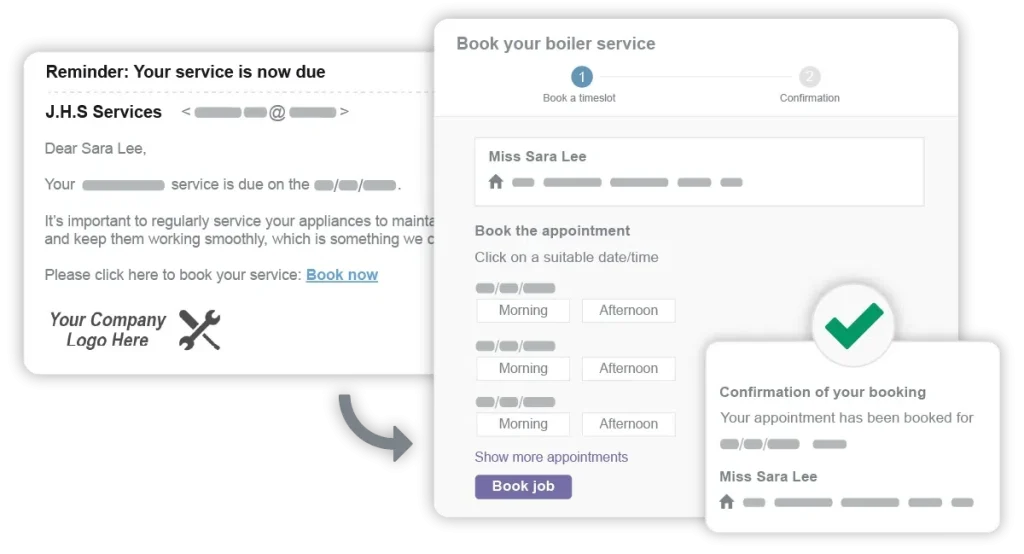
Secure Extra Revenue with Automated Service Reminders
Locking in predictable recurring revenue has never been easier with automated service reminders. Customers receive an email or text message when their service is due, along with a direct link to book the appointment online in just a few clicks.
This automation is a game-changer for businesses whose client base is rapidly expanding, significantly reducing your workload while still providing the quality experience your customers deserve.
Prioritise keeping customers informed as well, as this goes a long way in building trust. For example, automated ETA notifications are ideal for clients on the day of their appointment, which sends a text alert when their engineer is en route.
How to Successfully Upgrade Your FSM Software
Once you’ve chosen a new solution, it’s time to come up with a deployment plan. This will increase your chances of long-term success, so it’s worth spending time getting this right.
Check out our top tips for successfully changing your software provider:
- Review your documentation: Carefully go through your contract and make sure that you’ve adhered to their cancellation instructions properly, including notice periods, early termination fees, and renewal dates.
- Data migration: This can seem like a large undertaking, especially if you’ve been with your current provider for a long time. It should be completed on a phased roll out, and will consist of exporting, cleaning, and backing up your existing data. Your new provider will be on hand to support you during the process and ensure the transition goes smoothly.
- Testing the new system: It’s essential to test the software during this process to verify its compatibility, performance, and any bugs. Rigorous checking can also prevent unnecessary downtime later on by identifying issues early.
- Dedicated onboarding: This will help you configure key areas of the software and promote best practice usage, allowing your team to navigate the new system with ease.
Upgrade to Commusoft Today
Ultimately, if your current software is causing you more problems than it solves, it’s time to upgrade. While switching providers can feel daunting at first, you’ll quickly see how the best solution benefits your business from top to bottom so you can scale with confidence.
Commusoft’s powerful all-in-one FSM software was designed specifically for plumbing, heating and electrical businesses like yours, helping you confidently manage your entire operation in a centralised system.
Book a call with our friendly team today to find out how Commusoft can assist you in transforming your operations!







 English (United States)
  English (UK)