A standard invoice template is an invaluable tool for several key reasons, from saving your team valuable time on repetitive office tasks to streamlining the payment process.
Below, we’re exploring how field services businesses can use reliable invoice templates to reap these benefits.
A standard invoice template is designed to be simple to use and easy to replicate, so you can effortlessly customise them for the different services you offer. Not only this, but they can also help save your team time, bolster financial accuracy, and enhance customer satisfaction.
In this blog, we’ll showcase how a well-designed template can streamline invoicing for field service businesses, and briefly explore how to improve efficiency further by adopting job management software.
Without further ado, let’s dive into how to create an effective template that ensures consistency across your operations.

Why Invoicing Matters for Field Service Businesses
Without an invoicing solution, you’ll struggle to get paid.
And these days, you can hardly expect to take cash for every job, especially as customer preferences continue to sway towards digital payments methods.
An inefficient billing process can result in your team struggling to understand your financial health, losing track of revenue, or even misplacing important customer information. This creates an unstable foundation that puts your business at risk of delayed payments, financial shortfalls, and increased pressure on staff and customers alike.
By contrast, adopting efficient workflows allows your company to accurately bill for services rendered and maintain a steady cash flow, making it easier to meet your company objectives and achieve sustainable growth.
That’s why tools like standard invoicing templates are a must-have tool for busy trades businesses. It’s perfect for routine services where details rarely change, such as an HVAC inspection or boiler installation; a template ensures your billing is always fast and accurate.
Going back to the Basics of Invoicing
Whether you’re training new staff or getting used to new tools yourself, revisiting the basics can offer fresh insights into how you can streamline invoicing processes.
What is an invoice?
An invoice is a document that itemizes and records a transaction between a buyer and a seller. It serves as both a request for payment and a legal record of the transaction, often acting as an important reference point during a dispute.
For field service businesses, invoices should contain information like the following: services provided, job costs, and the agreed-upon payment terms. They may also include an itemized breakdown of parts, labor, and taxes, which is especially useful for high-cost jobs.
The Importance of a Standard Invoice Template
A standard invoice template simplifies billing by providing a consistent format that can be easily customized for each transaction.
When all the necessary details are already included, staff can minimize errors and reduce time spent on administrative tasks. This increases the likelihood of getting paid faster, too.
Creating a Standard Invoice Template
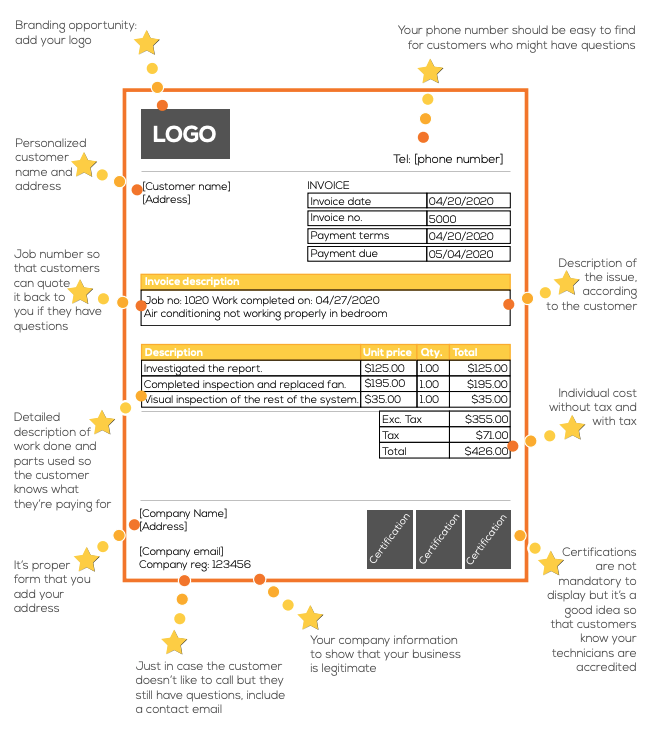
When creating a standard invoice template, be sure to include these essential elements:
- Company logo: place this prominently to ensure instant recognition.
- Customer details: add the customer’s name, email, number, address, and other relevant details.
- Contact information: provide your business phone number, email and address, so clients can easily get in touch.
- Service breakdown: outline the works performed, such as parts, labor, and call-out fees.
- Cost breakdown: display each line item with and without taxes for full transparency.
- Billing terms: incorporate a unique invoice number, payment conditions, and due dates.
- Accreditations: Showcase awards, licenses, and badges to prove your credibility and expertise.
You can see a typical example of a standard invoice layout below:
Download our Complete Invoicing Guide!
Design Tips for a Professional Template
The best invoice templates are detailed, yet user-friendly. To balance complete financial breakdowns and scannability, we suggest using a clean layout, clear headings, and well-spaced margins.
Using brand colors and fonts is important, as brand identity helps build trust, but make sure you prioritize clarity. Invoices must be clear and every detail legible for staff and customers alike. A professional design will take this into consideration and positively reflect your business by boosting customer trust.
Take another look at the image above to see a good example of the type of design you should be aiming for. You can use a document tool, like Microsoft Word, Google Sheets, or even a simple graphic design platform, to create your standard invoice template.
However, whether you plan to complete them digitally or by hand may influence which tool you decide to use.
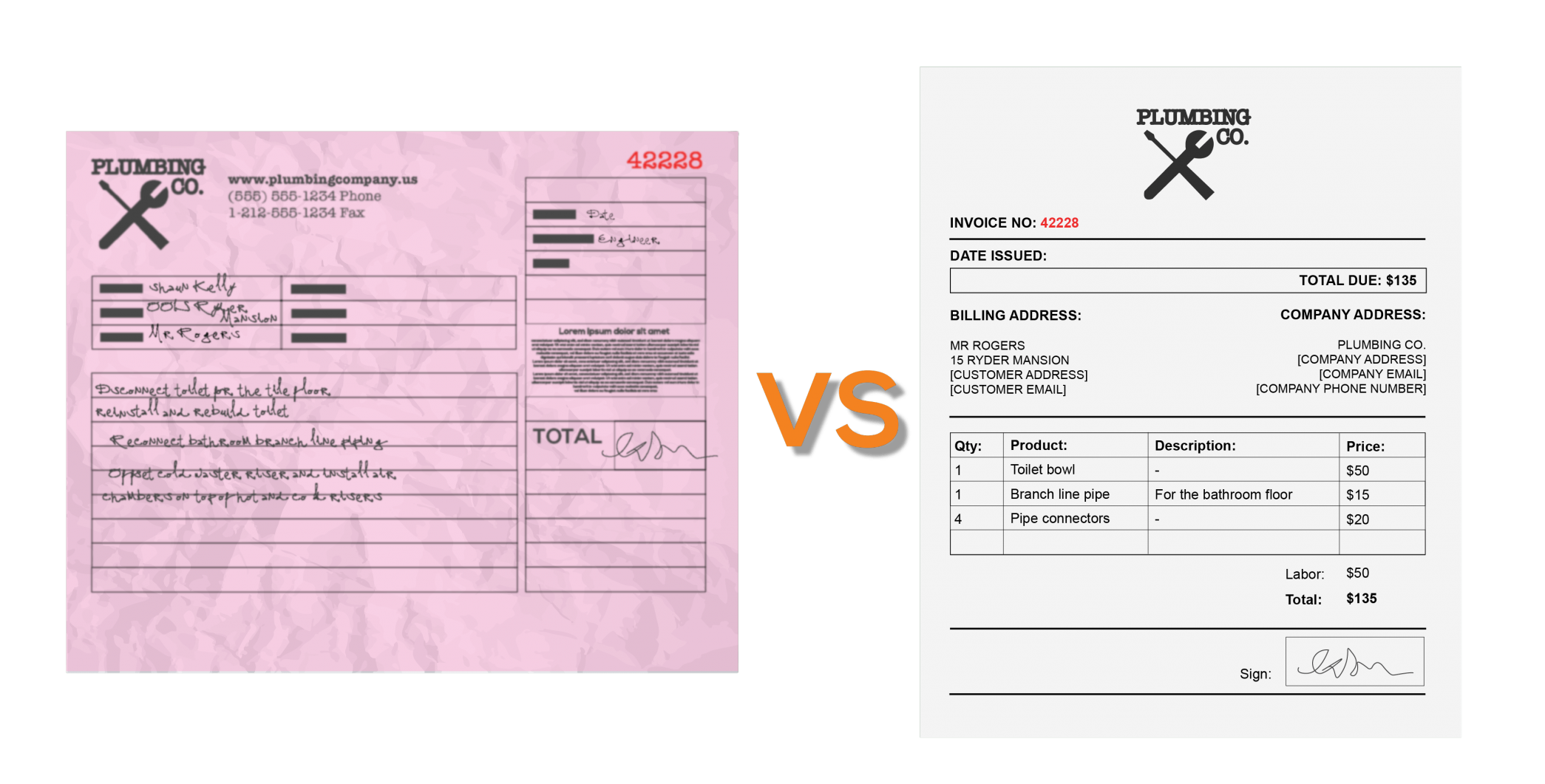
Paper invoice vs. standard invoice template
Best Practices for Using Your Invoice Template
Consistency in Issuing Invoices
Create a consistent schedule for issuing invoices e.g. weekly or monthly, as this helps maintain a regular cash flow and reduces the likelihood of missed payments. Keep your entire team on track, too, by setting calendar reminders to follow up promptly on unpaid invoices.
Setting Clear Payment Terms and Deadlines
It’s essential to clearly communicate your billing terms within your standard invoice template. Specify acceptable payment methods and have a space to clearly show deadlines to prevent confusion.
If there are any penalties or relevant terms & conditions, these should also appear. Establishing clear and comprehensive payment terms fosters better relationships with your clients and improves your cash flow.

Utilizing Technology for Efficiency
If you’re not already, it’s well worth leveraging digital software to streamline your billing processes.
Combined with a comprehensive customer database (including contact details, job data, pricing, and parts), invoicing software will enable your team to process payments more efficiently.
Built-in automation can help teams accurately generate invoices with minimal manual input. This makes everything from everyday jobs to long-term service contracts, easier to manage.

Invoicing with Commusoft
Invoicing is more than a financial transaction; it’s a vital component of your everyday operations. By adopting a standard invoice template and following the best practices outlined above, field service professionals can start to improve efficiency.
But that’s not all…
To go even further, you may want to consider invoicing software, like that offered by Commusoft. This can even integrate with your accounting solution, such as Xero, Stripe, or Quickbooks, to streamline workflows.
Our all-in-one software is designed specifically for field service businesses. From the convenience of on-site invoicing, to the ease of automated invoicing, Commusoft can transform invoicing into a seamless experience.







 English (United States)
  English (UK)