
If you’re a Commusoft user, this blog explores the ways that you can maximize your Commusoft plan!
While there are many, many fantastic features that will help you streamline productivity in the office and out in the field, we’ve highlighted a few essential features that users sometimes overlook…
There are many ways to grow with Commusoft and the flexibility of our software is one of the reasons why it’s become so very popular.
Whether you’re new to Commusoft, exploring our tools for the first time, or a seasoned veteran, this overview will provide valuable insights about the ways you can get more out of our software.
It’s not just our Plans and licenses that give you unparalleled flexibility, but the features within Commusoft itself that can help your team unlock all sorts of benefits.
That’s why we want to highlight the core features that some clients might overlook or otherwise miss, especially if you’re eager to use the software to its fullest.
Should you decide to adopt our all-in-one software solution, you can explore the following features:
- The Job Dashboard
- Proposals
- Technical References and Custom Fields

Understanding the Jobs Dashboard
Job tracking and management is at the heart of Commusoft, so it makes sense to begin with the jobs dashboard.
The dashboard is an incredible tool designed to eliminate inefficiencies in your scheduling workflow.
The job dashboard was designed to address common problems we’ve seen field service businesses tackle everyday, like scattered information, dealing with duplicated work, and a lack of visibility across different users.
By using the jobs dashboard, you can:
- Speed up daily operations: Access information instantly, reducing the need to search and improving response times.
- Reduce data duplication: Maintain a clear timeline of activities to avoid redundancies, ensuring that tasks such as sending certificates are only done once.
- Improve visibility of audit trails: Keep track of all communications and activities to ensure consistency and transparency.,
- Speed up collaboration: by assigning tasks faster within the team you can easily hand off tasks when necessary, ensuring that your team can focus on what they do best
For managers and business owners, the dashboard can alleviate bottlenecks, improve task prioritisation, and provide accountability, ultimately keeping your operations running smoothly.
Be sure to read our detailed blog to find out more about the Job Dashboard.

Proposals: Explore Powerful Sales Software
Proposals powered by Commusoft have the power to do more than simply tell your customer about the cost of a job.
Instead, these documents give them the detail they need to make informed decisions.
It’s better than a simple cost estimate; they enhance customer confidence and ease decision-making.
Unlike traditional estimates, proposals provide:
- Full Visibility: Know when a proposal is opened or accepted, so your team can follow up promptly.
- Multiple Options: Offer good, better, and best options to meet customer needs and budgets.
- Ease of Use: Allow customers to review, choose, accept, and pay a deposit seamlessly.
When you give customers the option to explore a “good, better, best” selection of options, you empower them to make a choice: one that they can be confident benefits them, without negatively impacting your business, too.
In this way, sales proposals overtake standard estimates by protecting your margins, helping to streamline the sales process, and helping your team to create a more compelling pitch to clients.
This reduces the time customers have to wait and means you can be proactive in giving them options to consider, without having to ask loads of questions.
After all, the longer the customer waits for information—or if there’s any uncertainty—the more likely they are to explore a competitor. Proposals reduce the risk of this occurring.
Commusoft’s sales engine helps you track proposals as they develop from inquiry through to paying jobs; our software gives you full visibility over the life-cycle of a job.

Find out more about Sales and Proposals by visiting our Sales page or book a call with our team for an in-depth look at the details, too!
Technical References: Record-Keeping at its Best
Technical references are crucial for recording essential property information. They help overcome challenges like lost time, siloed knowledge, and emergency delays. By integrating technical references, you can:
- Enhance Property Intelligence: Attach key information directly to customer records.
- Sync Field-to-Office Communications: Ensure instant visibility of updates made by engineers on-site.
- Eliminate Time Wastage: Prevent skilled technicians from wasting time searching for essential isolation points.
It’s all about recording key information about a property, asset, or other customer information that will help your entire team save time.
If you set questions with Custom Fields within our digital custom forms spftware, that means you can set up processes to ensure up-to-date information is always being collected.
With such information to hand, you can ensure you have accurate data which goes on to help your team, wherever they are.
From increasing the likelihood of finishing work on time, to the satisfaction of your customer, increasing the likelihood of them becoming a repeat customer.
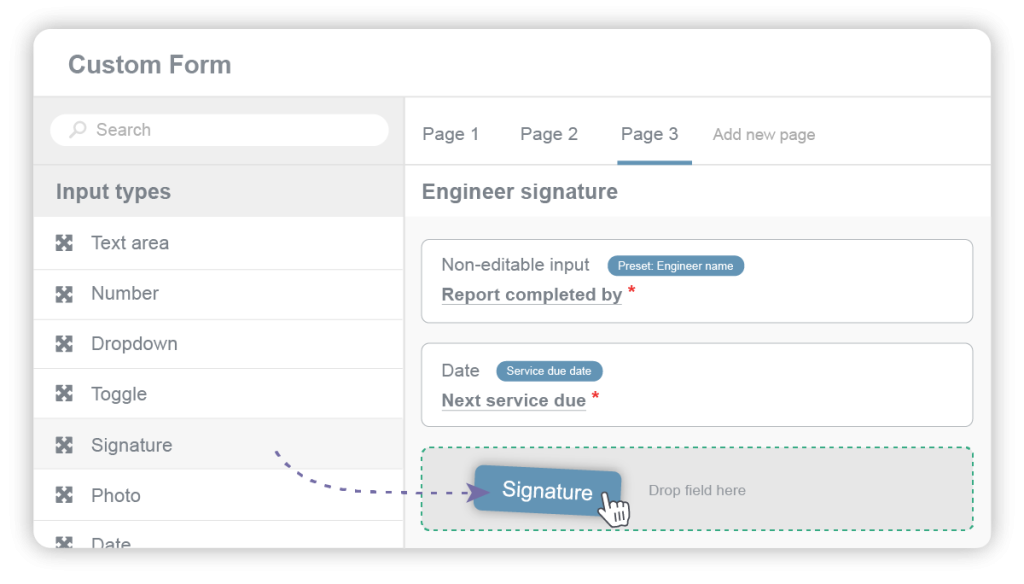
Using Custom Fields to Maximise Record Keeping
With Custom Fields, you can capture information relevant to a job and ensure your client’s information is detailed and accurate.
Custom fields allow you to capture vital information unique to your business needs, ensuring no important detail is overlooked. They help resolve issues such as incorrect postcodes or miscommunication by enabling:
- Non-Standard Data Capture: Add specifics like gate codes or site hazards directly into job and property templates.
- Pinpoint Navigation: Direct engineers precisely to their destinations, avoiding unnecessary detours.
- First-Time Access Success: Minimize administrative errors and lockouts.
Custom fields ensure consistent data capture and improve overall job accuracy.
With a deeper understanding of these features, you’re now equipped to maximise your Commusoft plan.
Ready to Maximise your Commusoft Plan?
The topic of this content comes courtesy of our team at Connect & Preview 2026: Commusoft’s flagship client event.
Whether you’re streamlining workloads with the jobs dashboard or ensuring vital information is captured with custom fields, these tools collectively enhance your business operations.
We’d encourage you to contact our Sales team or your Success Partner if you have questions about these core features or are keen to explore the ways Commusoft can help your business!






 English (United States)
  English (UK)