
Key Takeaways
- See how Commusoft’s Analytics software streamlines decision-making by allowing you to easily visualise critical data within a centralised system.
- Learn about common issues often caused by basic software tools and how Analytics resolves these problems.
- Discover how commusoft’s advanced add-on, Analytics+, can help you unlock even more value!
If you’re losing valuable time to clunky reporting processes, or reaching important decisions based on old data, it’s time to upgrade your solution.
Commusoft’s Analytics software is a powerful, enterprise-grade tool that provides businesses with complete visibility over their entire operation. Whether you’re looking to identify trends, reduce inefficiencies, or drill down into specific data sets, our solution is designed to help you scale with confidence.
Join us as we take a closer look at how Commusoft Analytics streamlines reporting, explore the essential features you should use, and explain how to get even more value with our Analytics+ add-on!

Common Challenges Businesses Face with Basic Reporting Tools
Relying on basic reporting systems to track performance simply won’t cut it for growing trades businesses, who need robust solutions to effortlessly handle their operations.
Here’s some of the common problems that can arise out of sticking with basic software to manage your business:
- Data isn’t updated in real-time: If your data is spread out across disconnected systems, your reporting is likely based on out-dated information. Proactive decision-making is almost impossible without a clear picture of your business’ performance, which can result in slower growth, lost revenue, and increased operational costs.
- System lacks complexity: An inefficient system can cause operational bottlenecks, system crashes and slow reporting, with time often wasted troubleshooting issues that could otherwise be spent on strategic planning.
- Increased chance of human error: There’s greater margin for error using simple reporting tools, as they require more human touchpoints. This frequently means data is incorrect or incomplete, making it harder to know where to allocate your resources, where you’re performing well, or what needs your immediate attention.
Encountering these problems every day can negatively impact your business, leading to staff frustrations, lost opportunities, or less revenue. But the good news is that many of these issues are avoidable by investing in the right solutions!
Benefits of Using Commusoft Analytics
Now you’ve seen the common challenges of relying on basic reporting tools, and how it can limit your growth, it’s time to move onto the many benefits of upgrading your solution.
Commusoft’s Analytics software provides you with a clear view of their overall business health, allowing you to save time, streamline reporting, and boost productivity. Let’s explore these benefits in closer detail:
Save Your Team Valuable Time
Commusoft Analytics is powered by automation, helping transform your team’s day-to-day work into instant, detailed insights. Instead of losing hours of time manually compiling data for reports, you’ll have a top-down view of your entire business in a centralised system.
Automated workflows also massively reduce the need for manual data entry, thereby improving data accuracy and saving time. This ensures your decision-making is always based on clear, verifiable information, rather than guesswork.
Quickly Identify Operational Bottlenecks
Commusoft provides a wealth of data for users in just a few clicks, so you can address inefficiencies before they negatively impact your profit margins.
Intuitive features like adjustable reporting periods enable you to analyse trends spanning months, or to drill down into a single off-day for a specific engineer. This granular level of detail gives you an in-depth look at your service performance, permitting you to promptly resolve issues that need your immediate attention.
Make Smarter, Data-Driven Decisions
Analytics offer you a highly accurate, up-to-date view of your business’ health, so you’re confident that any decisions are backed by quantifiable data.
Plus, when your reporting is based on real-time information, it changes from a monthly chore to an easy daily check-in. You’re no longer managing your business retrospectively, and are perfectly positioned to catch productivity dips or cost spikes early.
What we loved when we switched was just the automation of a lot of the basic processes. Everything from confirming the job at the time of booking, to the flow of information in real-time. That’s been a real game-changer for us.
Will Anderson, Partner of C. Anderson & Sons
Main Features of Commusoft Analytics
Robust business reporting software is a must-have for any growing field service businesses, whether you’re looking to monitor SLA performance, job costs, or customer retention rates.
Commusoft’s Analytics suite allows you to do this and much more, so let’s explore its features in greater detail:
Personalised Reporting Dashboard
Our Analytics dashboard provides you with a flexible, real-time view of your business performance. It’s mainly used to track progress against defined targets, monitor high-level metrics at a glance, and spot visual trends over time.
It’s designed to be user-friendly and easy to navigate, with the left-hand panel acting as the central hub for all your reporting. From here, you can carry out a range of actions to effortlessly find critical data, including:
- Clicking the star icon next to any report to add it to your Favourites list.
- Utilising the Recently Viewed section at the top of the panel to return to the dashboards and reports you opened last.
- Using the Search bar to locate a specific report by name.
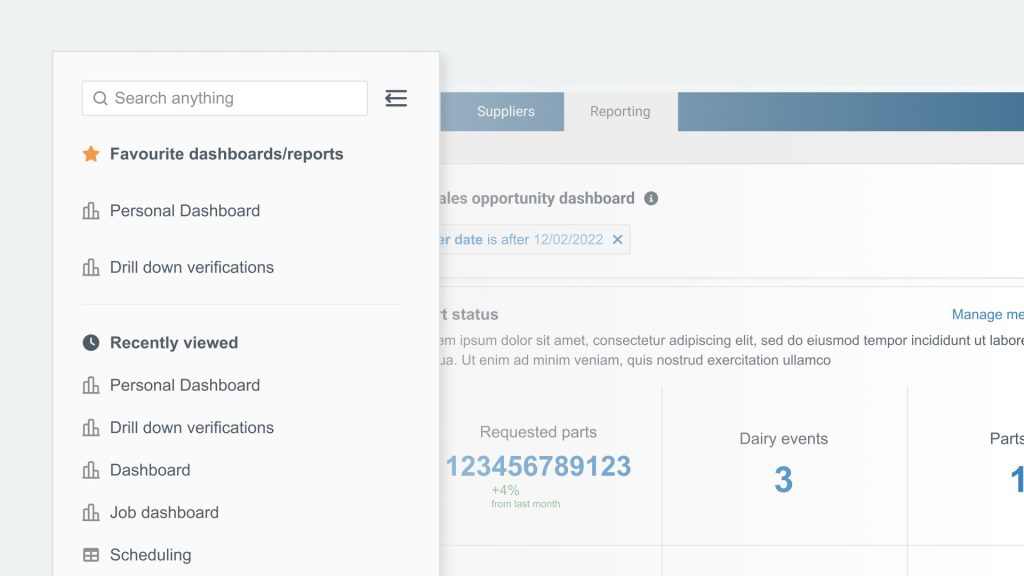
The dashboard’s customisability is its key strength: you can leverage adjustable widget sizes, variable graphs, and filters to surface the data you need the most, all in one centralised screen. This way, you’re able to easily visualise the most important details, and guarantee it’s always accessible for key stakeholders.
Customers on our Customer Journey plan can go a step further and create custom widgets. This offers you complete control over what you measure, how it’s calculated, and the specific timeframe it covers.
Tabular Reports for Advanced Data Analysis
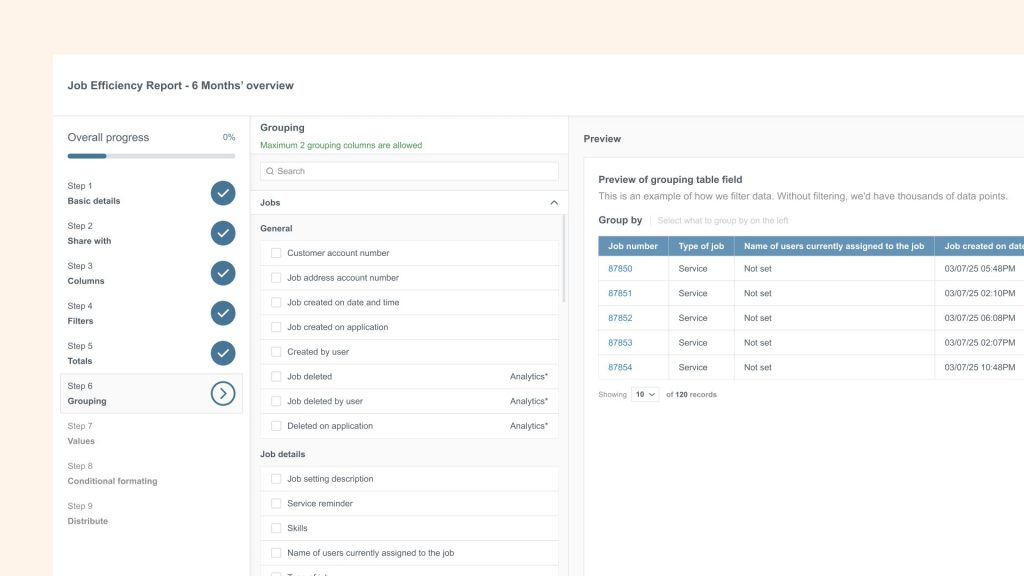
While dashboards are great for high-level visual summaries, tabular reports deliver unparalleled granular detail. Functioning like spreadsheets directly in the Commusoft app, they give you the ability to perform in-depth investigations into specific records.
The platform’s customisability shines again in the tabular report builder, with noteworthy features including:
- Totals: Use this to incorporate mathematical equations – like sums or averages – to numeric columns.
- Adding Filters: Narrows down your report to only show rows that meet specific conditions or fall within a certain period of time.
- Grouping data: Organises rows into collapsible sections, such as grouping your profitability report by Last engineer on site.
- Value: Applies values to define which numeric values should be calculated and displayed for each grouped section.
- Conditional formatting: With this feature, you can assign visual rules to your report to highlight specific data (e.g. you might colour a row green if the Grand Total is greater than or equal to a specific amount).
After you’ve saved your tabular report, it’ll immediately load onto your dashboard and display your data; it’s that simple!
A Dedicated Reporting Marketplace
Commusoft’s report marketplace is a library of professionally configured reports built around the metrics field services commonly track (e.g. first-time fix rate by engineer, revenue by engineer, and debtors by aged debt).
Adding content from the marketplace is the fastest way of getting meaningful data into your dashboard without having to build anything from scratch. Pre-defined categories target key business areas – like operational performance, CRM, invoicing and profitability, and engineer performance – to streamline the process further.
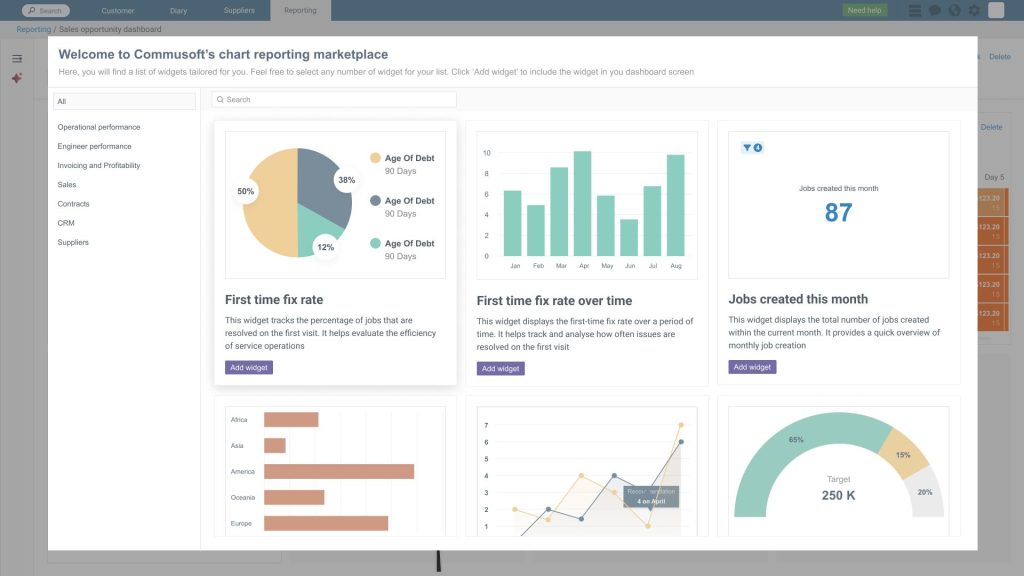
Once you’ve added a widget, it’s instantly available in your dashboard and connects to your live data with no more configuration required. When you add a tabular report, it’s saved directly into your chosen folder, ready to be viewed or downloaded.
Pre-built templates are especially beneficial when you first start using Commusoft Analytics, not only saving you a lot of time from manually formatting reports, but also ensuring best practices are followed by your team.
Data Sharing
Keeping key stakeholders informed is a breeze with Commusoft’s job management software, supporting you in making decisions faster, allocating resources more efficiently, and delivering transparency.
Users can securely share insights with stakeholders in a range of ways, incorporating:
- Downloading reports: This extracts raw data as a spreadsheet, so you can send it to team members or perform further analysis outside of Commusoft.
- Exporting a report: Choose this option to share a report’s configuration with another Commusoft user. The system generates a ZIP file that they can import into their own account and instantly recreate your report structure!
- Importing a shared report: If your colleague has exported a report as a ZIP file, they can also import it straight back into your Commusoft account. This is the quickest way to standardise processes across your team without having to rebuild the report from scratch.
Commusoft streamlines data transfer to foster better collaboration across your team, and make it simple to present key data findings to stakeholders. From day-to-day teamwork to high-level presentations, our Analytics suite ensures everyone stays aligned.
Get Even More Value with Analytics+
Commusoft’s Analytics+ add-on is ideal for teams of 15+ with multiple service departments that need extensive, automated business intelligence. It’s a robust tool that tracks specialised metrics and broadcasts real-time success across your entire organisation.
Here’s just a few benefits you can take advantage of by upgrading to Analytics+:
- Segment your data: Maintain complete control over data visibility by creating viewing permissions for reports and dashboards. Granting access to specific team members allows you to share data securely and confidently.
- Create unlimited dashboards: Build a dashboard dedicated to every business need to gain detailed insights into your operations. Also, visualise data in a format that works best for you with an extensive library of advanced BI widgets and tabular reports.
- Schedule reports: Automatically generate and send reports to key stakeholders on a pre-defined basis to save time and keep everyone updated. Whether it’s a report showing invoices due, jobs booked, or cash in the bank, information is sent directly to the recipient’s inbox without any manual input requird from your team.
- Stream reports in your office: Displaying leaderboards is a great way of motivating your employees with a little friendly competition, ensuring those all important KPIs are met!
Check out our blog to discover more benefits of upgrading your field service software, so you can maximise your ROI!
Unlock Your Data with Commusoft
You’ll now have a clear idea of how Commusoft Analytics enables ambitious trades businesses like yours to master their data. Instead of wasting time manually compiling reports, your team can focus on other priorities that’ll help you achieve growth objectives.
Our all-in-one system gives you a much clearer picture of your overall business health, and is packed with intuitive features that streamline your reporting from start to finish. These include:
- Tabular reports that offer a granular level of detail to facilitate advanced data analysis.
- A personalised reporting dashboard that provides a user-friendly interface and a high-level overview of your business performance.
- A dedicated report marketplace that contains a range of pre-built reports so you don’t need to build them from scratch.
- Secure data sharing to encourage seamless collaboration between team members.
If you’re interested in finding out more about Commusoft’s field service management software, schedule a call with our team today!






 English (United States)
  English (UK)