
Key Takeaways
-
Discover our guide to service reminders, including what to include, when to send them, and the importance of personalization.
-
See how all-in-one software can automate the process so you can send reminders on a schedule that works for you.
-
Also find out what to do if your customers don’t respond to increase your chances of success.
In this blog, we’ve aimed to provide you with a complete guide to service reminders. With our advice, you can craft useful messages to help boost customer loyalty and win your business more work.
You’ll also be able to download our Customer Communication Toolkit to access templates that are designed to save you time and keep your clients happy.
Let’s get started…

Benefits of Using Service Reminders
Service reminders are messages sent to customers to prompt them to book an inspection, maintenance, or service appointment.
Reminding customers an inspection is due allows your business stay top-of-mind when they need additional services.
They can benefit trade businesses by boosting their number of returning customers, appointments booked, and recurring revenue.
They’re also ideal for customers who have signed up for recurring maintenance agreements, acting as a great way to show them you’re committed to providing a reliable experience.
The best service reminder management tools, like those found in Commusoft, enable users to create custom message templates for each service they offer and send messages out automatically.
When to Send a Service Reminder
It’s impossible to overestimate the importance of timeliness in a service reminder guide. Ultimately, being the first to inform customers of an upcoming service means you’ll be far less likely to miss out on their business.
You’ll first need to establish dependable workflows internally. It’s essential to strike a balance between sending these out early to allow your customers to make a decision, while also ensuring you’ll be available for the work order.
The best time to send a service reminder depends on your business, but a good rule of thumb is to send them around a month before they’re due. Recurring services also shouldn’t come as a surprise to your customer, so a reasonable heads-up is to be expected.
Be sure to establish a process to guarantee reminders are sent out regularly, at the same time each month for example. If you’re struggling with this, consider implementing job management software to help your team expertly handle any scheduling challenges.
Note: Send a reminder too early and the customer is likely to ignore it; send it too late and the customer might already be in contact with your competitors.

What to Include in Your Service Reminders
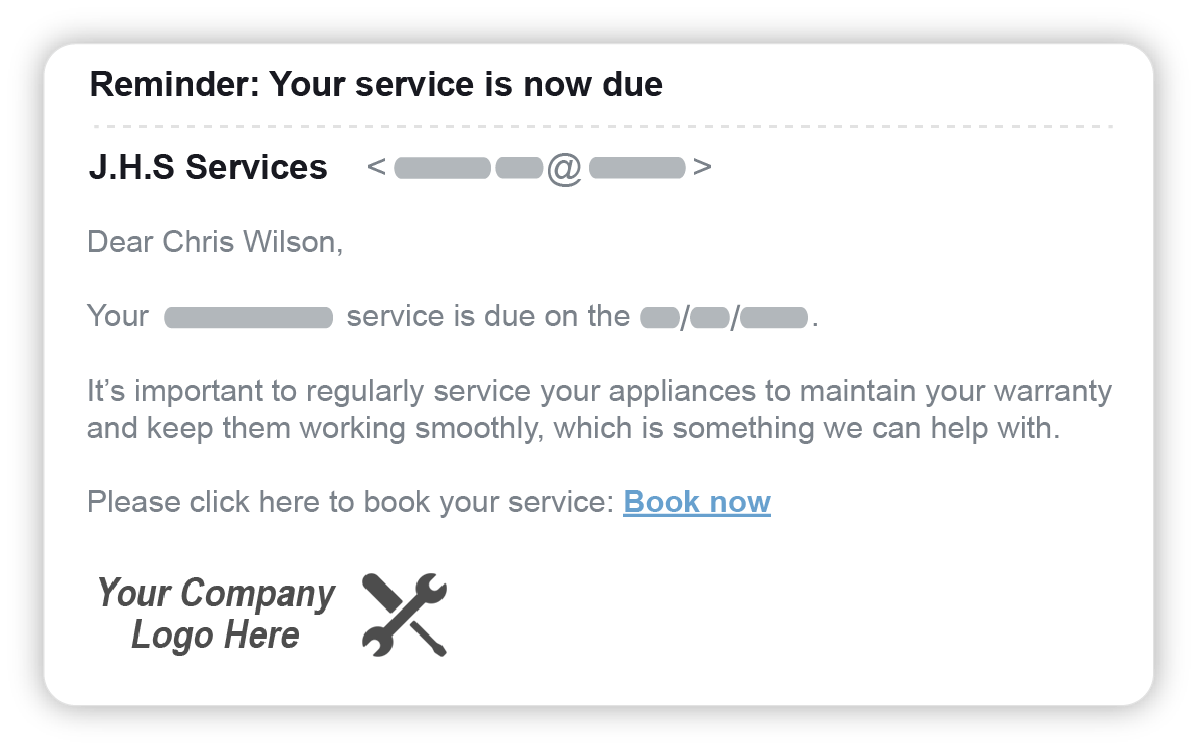
Service reminder templates can be as short as a few sentences, but should clearly highlight important information to grab your customer’s attention and persuade them to choose your team again.
A study by Boomerang found that messages written at a third-grade reading level get the best response, and the sweet spot for email length is between 50 and 125 words.
Let’s explore the must-have components for your next service reminder message:
1. Service Details
Your customer might have only worked with you once before. Use this as an opportunity to recap what your team installed, serviced, or inspected, and why they should book a maintenance appointment with you.
For any customer you reach out to, be sure to specify which appliance (if any) you’re referring to, and which service your team will perform. This is especially useful for customers with multiple properties.

2. Company Information
Providing your company information can serve as a great reminder for customers who have worked with you before. Re-establishing and building trust is crucial, so write about why your team is the best option for the customer.
But if this is a reminder for a regular customer, you company details and contact information won’t be necessary.
In both scenarios, clarify the action you want the client to take, like whether you prefer them to call or email your team.
The best software offers the ability for customers to book their service through your dedicated online portal by sending them a link in their reminder message. This self-service solution frees up admin tasks, while empowering clients to request jobs outside of regular hours, or when they don’t want to make a phone call.
3. Pricing and Payment Information
If you offer flat-rate prices that can set you apart from competitors, including them in service reminders can compel prospective customers to choose you.
In the same light, clarifying any financing options or discounts you provide is extremely helpful.
It’s also a great opportunity to remind existing customers if they have any complimentary inspection appointments as part of their service plan, as they’ll appreciate you being proactive about maintaining their appliance.
4. Links to Resources
One of the key purposes of service reminders is to win more return business. Adding concrete examples within your messages can encourage customers to take the initiative and book preventative maintenance appointments with your team.
For example, you can share a tidbit such as “regular electrical generator inspections can prevent pricey issues like low coolant or oil, clogged lines, or wiring issues”.
You could even provide links to information about their appliance and the benefits of annual service appointments.
Personalizing Reminders Based on Customer and Job Types
Creating multiple service reminder templates saves time in the long run.
To start, we recommend beginning with one for commercial building managers and landlords, and one for residential customers.
After all, regular interactions are instrumental in maintaining healthy customer relationships. This practice will also keep your business at the forefront of a customer’s mind for both services and repairs.
Residential Customers
Residential customers are not under the same legal obligations as commercial clients. Therefore, you should structure their service reminders as well-meaning advice. Here’s our top tips to increase your chances of success:
- Use your template text to remind them of the benefits of regular annual services and guide them toward making an informed decision.
- Depending on the service in question, your B2C customers may have many service providers to choose from. But luckily there’s many ways to differentiate your company, such as timely reminders, flexible payment options, and sharing resources.
- Leverage a service reminder platform to customize whether messages will be sent to landlords, property managers, tenants, or all of the above.
Commercial Customers
Property managers will need a service reminder that details each of the properties that need to be tended to and the required services. As this is a legal requirement, this serves as more of a notification rather than a sales pitch.
While the general service options can vary, the main difference between your residential and commercial messages is how you phrase the content.
Commercial clients want to work with trustworthy, speedy service providers that don’t come with complications. Software can help your admins customize which decision-maker will receive the service reminder.
Jobs with Contracts
Service contracts or agreements are legally binding documents that outline the timeline of the specific services your business will provide to a client.
Your customers are busy, and depending on the length of time between appointments, some of them may forget they have a contract with your business.
Further, with so many recurring contracts to manage, it’s all too easy for details to slip through the cracks.
That’s where automated service reminders come in handy; everyone receives the updates they need when they need them.
Use your reminder message to clarify important terms of your agreement, stipulate when the service should be booked, and advise customers whether the service is included in their contract or not.
Other Considerations When Sending Reminders
Consider the following points when creating your service reminders to increase your chances of grabbing the customer’s attention, securing potential revenue, and standing out from your competitors:
- Change your tone of voice: Don’t simply send the same information for every type of reminder. Make minor adjustments to the words you use, as this can make an impact on how well and how quickly the customer responds.
- Understand the urgency: It’s a good idea to introduce a note of urgency in your service reminder, but do so with a light touch. For example, if the customer is a property manager or planning to rent out the property, you might refer to the fact that a regular service record is essential when putting a house on the market.
- Use promotional offers wisely: Remember, every contract with a customer is a potential sales opportunity, and that includes service reminders! This might entail offering a seasonal discount on winter services during the busy summer months, or advertising additional coverage when an installation is coming to the end of its warranty.
- Utilise the word remember: Adding this word to the subject line (or the beginning of your letter or SMS reminder) separates your message from other marketing and junk mail that’s bombarding your customers.
- Start with a friendly greeting: Your service reminders should always open with an acknowledgement of who you’re reaching out to. Simply addressing them by name is an easy way of improving customer care.
- Be direct: Always assume your customers are short on time. Just like you, they have a lot to handle each day.
What if Your Customer Doesn’t Respond?
If you send a service reminder and don’t receive a timely reply, don’t panic! A clear follow-up process makes service reminders less stressful.
On average, only 21.77% of emails sent from field service businesses get opened.
Don’t assume that no response automatically means they aren’t interested in getting that service booked in.
Field service management software can prove invaluable in these instances by allowing you to automate customer follow-ups. It can even send a different email to contact those who haven’t interacted with the first message.
You’re much more likely to get in touch with customers over the phone. Use this conversation to discuss the work they need done, stress the urgency of the appointment, and provide more information about how your service can prevent costly issues in the future.
When your customer doesn’t reply to repeated reminder messages and phone calls, it’s time to stop reaching out. Instead, they might get in touch with your team if their appliance breaks.
Using Software to Automate Your Appointment Reminders
With Commusoft’s all-in-one solution, you can send reminders on a schedule that works for you (since not all services are annual).
With customization at its center, Commusoft clients build and utilize different email and letter templates for each customer and service type.
Service reminders are always consistent with your business’ style, too, meaning you can provide expert customer care every time!
Get started today by downloading our customer communication toolkit below, and be sure to check out the service reminder ROI calculator to calculate the potential earnings your business could generate!






 English (United States)
 English (UK)